
Superbuy QC Photos: Ask Whether the Image Answers Your Question
Superbuy QC photos are useful when you can connect a visible detail to the item and option you ordered. Their purpose is not to turn every photograph into a blanket quality verdict. Begin with a question that an image could actually answer: selected colour, visible construction, quantity or a particular measurement.
Superbuy's shopping-agent guide describes warehouse inspection photos after arrival. That general workflow does not establish which angles, measurements or additional services your particular order includes. Check the record and any service terms before requesting more.
Confirm whose item the picture shows
Match the photo set to your own item record and selected variant. A picture found in a public QC finder or shared spreadsheet may belong to another order, size or production version. It can help you formulate a question, but it is not inspection evidence for your purchase.
Keep seller images separate from warehouse images. Seller pictures describe a presentation of an offer; warehouse pictures concern an item at that stage. Neither should silently replace the other in a comparison.
The spreadsheet links guide helps preserve the correct listing and option when similar products are involved.
Start with the decision, then choose the view
Different questions require different views:
| Question | Useful view | Remaining limitation |
|---|---|---|
| Does the visible colour resemble the selected option? | Clear overall view with neutral lighting | Screen settings and lighting can affect colour |
| Is a fastening or seam visibly damaged? | Focused close-up of that area | Hidden construction remains unseen |
| What does a label say? | Legible label close-up | The label alone does not prove authenticity |
| What is a particular dimension? | Measurement with start and end points visible | It does not establish how the item fits a person |
| Are expected visible components present? | Overview showing the relevant pieces | Parts hidden in packaging may need another view |
An attractive overall image can still be unsuitable for the question you need answered. Do not use the number of photos as a substitute for checking their relevance.
Make a measurement request specific
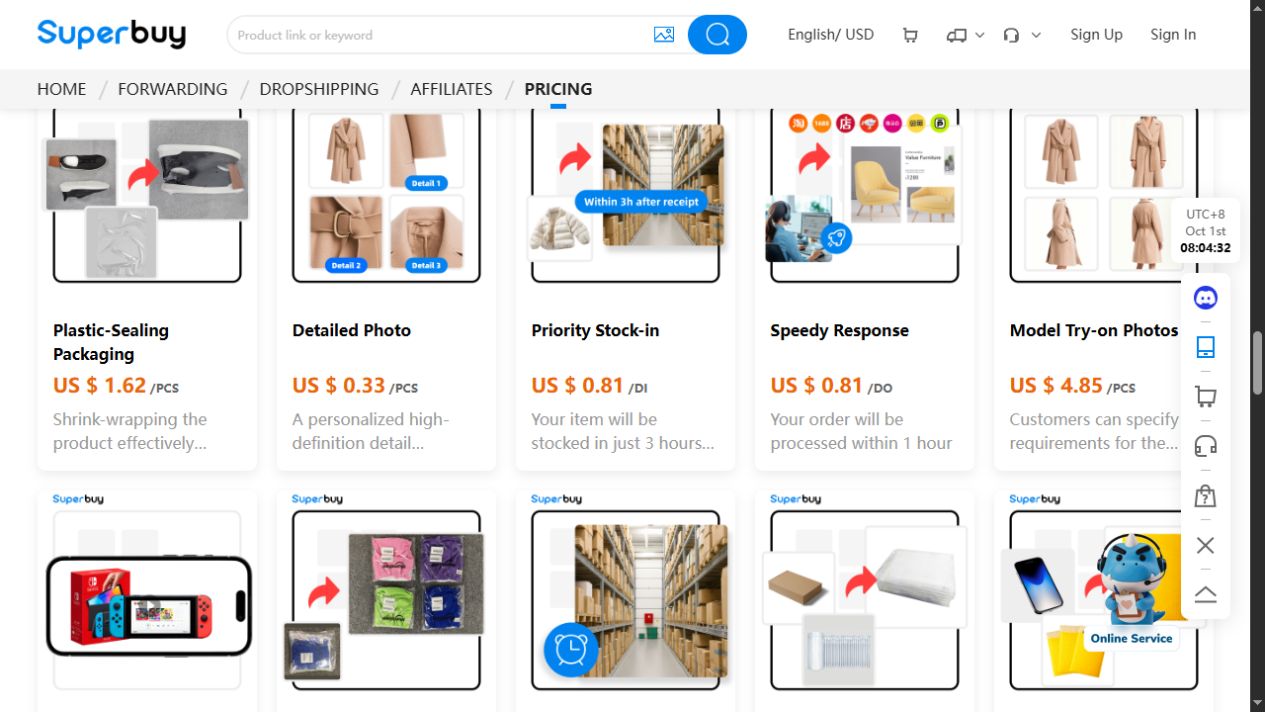
The platform’s pricing display on 1 October 2026 lists Detailed Photo at US$0.33/PCS and describes a personalised high-definition detail. This screenshot illustrates the service listing, not proof that a particular measurement was performed or included. Confirm the terms for the view you actually request.
Identify the item, dimension, unit and method. For a hypothetical jacket request: “Please show the flat chest width from underarm to underarm in centimetres, with both tape endpoints visible.” This is an example of wording, not a performed inspection or a promise that the service is available without charge.
Compare that measurement with another garment measured the same way. A flat width is not body circumference, and a size label is not a measured dimension. The size guide explains how to avoid comparing unlike values.
If the tape is angled, its start is hidden or the item is folded over the relevant area, ask for clarification rather than extracting a confident number.
A printed scale may be a virtual ruler
A garment photo shared in a community Superbuy QC post shows centimetre scales along the image edges. The image itself labels the ruler as virtual and warns that small deviations may occur. This illustrates the difference between a scale added to a photograph and a tape visibly measuring the garment. Another buyer's image cannot establish the measurements of your own item.
Before comparing a number with your own clothing, ask where the measurement starts and ends. A sleeve folded across the body can hide the underarm point even when the edge scale is readable. For a fit-critical decision, request the specific flat measurement with a physical tape and the relevant garment endpoints visible, then compare like with like. Do not infer a precise chest width simply from where a rotated garment appears beside the image border.
Record observations without adding unsupported conclusions
“The photographed label reads M” is an observation. “This will fit me” adds assumptions about measurements and preference. “The visible stitching appears continuous in this view” is narrower than a claim about durability.
Photos cannot establish comfort over time, internal materials or authenticity on their own. If a property is important and not visible, identify the evidence needed instead of interpreting image quality as product quality.
This distinction also matters when reading a spreadsheet review. A positive comment based on photos should not be described as a received-and-worn experience.
Resolve an issue before changing the order stage
If the wrong visible variant or a meaningful defect appears, preserve the specific image and compare it with the order selection. Ask what action is possible under the conditions for that item.
Separate a request to return or exchange from approval of that request. Do not assume that sending a message pauses every deadline or guarantees a remedy. Keep relevant replies with the order privately.
Use warehouse guidance to locate the item stage and the ordering guide to understand the next decision. Moving to international shipment while a product question is open can change the available options.
Share examples without exposing personal information
Before posting a QC image or screen capture, remove names, addresses, order identifiers, tracking numbers, account details and scannable codes. Check the edges of the screenshot and any notifications.
Use material you are entitled to publish. A publicly viewable image is not automatically licensed for reuse, and another customer's permission should not be inferred from their posting it elsewhere.
If you want community input, show the relevant product detail and ask the narrow question. Do not upload the whole account page for convenience.
Common questions
Is a QC viewer the same as image search?
No. A viewer displays images associated with records; image search seeks candidates resembling a reference. Read the image-search guide without assuming either tool has verified your order.
Can another buyer's photo replace mine?
It can illustrate a question, not confirm what your order contains. Match evidence to the actual item and stage.
Should every unclear image lead to a rejection?
First determine whether a better angle or clarification would resolve the question. Make the decision from what matters to you and the options actually available.
Return to the Superbuy spreadsheet overview for discovery and the safety guide before sharing private records or acting on unfamiliar requests.
To prepare a footwear inspection, open this sneaker listing on Superbuy and note the option and details you want checked. Compare your eventual warehouse photos with that confirmed selection, not with another buyer's similar-looking pair.